Style
Capitalization
As a general rule, use sentence casing unless there is an exception outlined below.
- Easier to scan
- Saves space
- Sends off a casual and friendly vibe
- Ensures consistency with simplification of rules
This is sentence case
Do
This is Title Case
Don't
This is UPPERCASE
Don't
Exceptions
UI references
When referring to a UI reference on the screen, match the casing of the reference. UI references are defined as visible elements on the screen.
Click Exit and Save to continue
Do
Click exit and save to continue
Don't
In the following example, public pages describe the type of pages and do not reference a navigation item.
Use the same mobile device rules found in public pages
Do
Use the same mobile device rules found in Public Pages
Don't
Features
Don’t sub-brand features when making a general reference. Talk about the feature so that it sounds natural in conversation.
- Our writing should focus on the user’s intentions rather than on the product itself.
- Unnecessarily bringing attention to A New Feature is distracting and often intimidating.
- Sub-branding can impact the product and Liferay’s overall brand perception.
There were changes made to your workflow.
Do
There were changes made to your Workflow.
Don't
Changes have been made to this template, exit without saving?
Do
Changes have been made to this Asset Publisher Template, exit without saving?
Don't
Proper Nouns and Abbreviations
Proper nouns including branded terms should always be title cased. Abbreviations are all uppercased.
Your DXP instance is connected to Analytics Cloud
Do
Your dxp instance is connected to analytics cloud
Don't
Navigation
Navigation items should be title-cased.
- Application names are in title case in menus, but within a sentence should be sentence case.
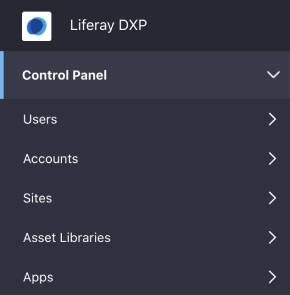
Do
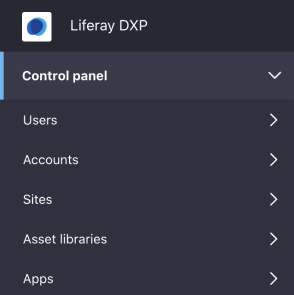
Don't
Small Labels (component)
Small label components in size 10 font styles should be uppercased to meet accessibility standards. This rule does not apply to default size labels, however it is recommended. Removable labels are usually a result of user input, therefore should match the casing of the user’s input.
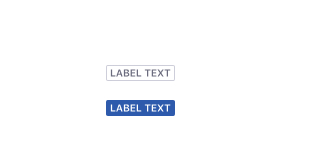
Do
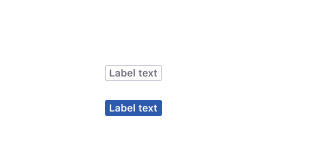
Don't
Labels (non-component)
Some UIs such as charts that require labels to provide additional context to the user. These labels should also use 10 or 12 px font style and should be all uppercased.
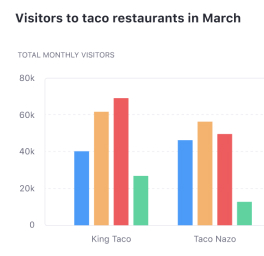
Do
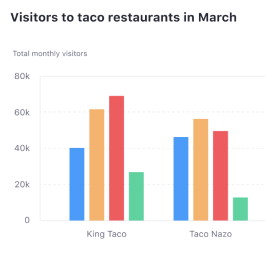
Don't
Section Dividers
Section dividers are found in navigation, forms, and tables. These are all uppercased.
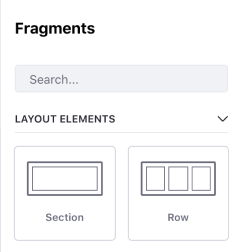
Do
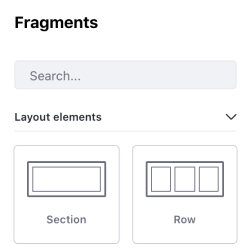
Don't
Punctuation
Full sentences should have proper punctuation. Full sentences contain a subject and predicate.
An administrator must grant permission to delete users.
Do
An administrator must grant permission to delete users
Don't
Fragments/phrases help save space in the UI and are less formal. Phrases are neither a title/heading nor a full sentence (containing a subject & predicate).
- They do not require punctuation, however, they should be in sentence case.
- Common areas that contain phrases that won’t require title casing or punctuation
- Bullet lists
- Radio buttons
- Check boxes
- Form field headers
- Labels
- Sub-headers
- Help text
- Hover text
- Table headers
Grant delete permissions
Do
Grant delete peremissions.
Don't
Hyphens, Ens, & Ems
- '-' Hyphens used in compound words
- '–-' Ens relate to ranges
- '—--' Ems similar to semicolons, are used for an interruption in a sentence.
Em dashes are not allowed. If there is a case where you want to use this or semicolon, consider breaking it into 2 sentences.
Numbers
We will take a local (US english) approach to numbers and dates to provide a consistent baseline for our translation services. We still prioritize clarity in the selected styles in case a translation does not occur.
Zero through nine rule
In a non-technical sentence, spell out any single digit number. Use numerals for anything greater than nine. This goes for both ordinal and cardinal numbers.
Ordinal numbers
First, second, third, fourth, fifth, sixth, seventh, eight, ninth
Tthe second payment is due in 30 days.
Do
The 2nd payment is due in 30 days.
Don't
Cardinal numbers
One, two, three, four, five, six, seven, eight, nine
There are two data sources that need your attention.
Do
There are 2 data sources that need your attention.
Don't
There are 12 data sources need your attention.
Do
There are twelve data sources that need your attention.
Don't
Numbers in UI
Numbers used in UI elements are an exception to the previous rule. Use numbers in the UI, do not spell it out.

Do

Don't
When exact numbers are necessary, use a comma to separate thousands, millions, billions, etc.
1,234,567
Do
1.234.567
1 234 567
12,34,567
1'234'567
Don't
In some cases, knowing the exact number does not provide added value to the user. In these cases express very large numbers in numerals followed by million, billion and so on. If required, exact numbers can be revealed in hover states or drill downs.
4 million visitors
Do
4,042,239 visitors
Don't
Abbreviations can be used to save space. However, abbreviated format should be limited to screens offering a quick overview of the numbers and charts. Separate the abbreviation from the number.
123 K
123 M
123 B
Do
123k
123mm
123bn
Don't
Rounding to 1 decimal place is acceptable.
123.4 M
Do
123.44 M
Don't
UI References
Similar to the capitalization rules surrounding UI references, match the styling of the UI reference that contains a number.
There is an error on line 4
Do
There is an error on the fourth line
Don't
Dates
Dates are complex when writing for an international audience. We use American english style, to promote consistency for our translation services. We recommend using the full date whenever possible, but abbreviations are acceptable to save space.
| Format | Full | Abbreviated |
|---|---|---|
| Month and date | Month DD | Mon DD |
| Month and year | Month YYYY | Mon YYYY |
| Month, date, and year | Month DD, YYYY | Mon DD, YYYY |
Months can be abbreviated on UI elements spell out the month name (at least three characters).
Jan
Feb
Mar
Apr
May
Jun
Jul
Aug
Sep
Oct
Nov
Dec
If you must write the dates in numbers our preferred format is the ISO-8601 date format: YYYY-MM-DD Keeping this consistent is critical, as the changing formats will cause a lot of confusion. Please note, number-only date format is not recommended.
2020-02-25
Do
25/02/20
2020-25-02
02/25/2020
Don't
Time
Always use a.m./p.m. to indicate time of day. Leave a space between the numeral and the a.m./p.m. Whenever possible, use noon or midnight instead of 12:00 a.m./p.m.
4:45 p.m.
Do
4:45pm
4:45PM
4:45 pm
4:45 PM
Don't
Scheduled maintenance at midnight PST
Do
Scheduled maintenance at 12:00 a.m. PST
Don't
Do not include :00 when there is not a minute reference.
5 p.m.
Do
5:00 p.m.
Don't
For a range of time, use the en dash with no spaces between. Only include a.m./p.m. on both times if necessary. If they are the same, add it to the last time.
4 - 5 p.m.
11 a.m. - 2 p.m.
Do
4 p.m. - 5 p.m.
11 - 2 p.m.
Don't